
In This Article
Who can use this feature?
- Pike13 Plans: ✅Premium, ✅Advanced, ✅Essential
- User Roles: ✅Primary Owner, ✅Owner, ✅Manager, ✅Staff, ❌Limited Staff
Viewing Client Side Menu: Managed Clients
-
At the top of any Pike13 page, click on Clients.
-
Search for and select the client you wish to view.
-
Go to the right hand menu.
-
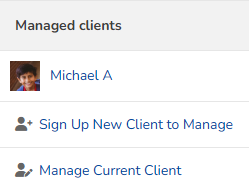
Under Managed clients, staff my view:
-
A list of all currently managed clients/dependents. These profiles may be clicked to see further details about them.
-
Sign Up New Client to Manage to create a new client account for the current client to manage
-
Manage Current Client to link a preexisting client profile to the current client to manage
-