
In This Article
Who can use this feature?
- Pike13 Plans: ✅Premium, ✅Advanced, ✅Essential
- User Roles: ✅Primary Owner, ✅Owner, ✅Manager, ❌Staff, ❌Limited Staff
Advanced Actions
-
At the top of any Pike13 page, click on Clients.
-
Search for and select the client you wish to view.
-
Go to the right hand menu.
-
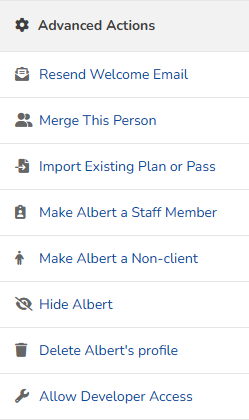
Under Advanced Actions, staff my view:
-
Resend Welcome Email to allow clients to claim their account
-
Merge This Person will allow you to combine duplicate profiles
-
Import Existing Plan or Pass to add a pass or plan to a client's account without creating an initial bill
-
Make client a Staff member creates a staff profile for a client
-
Make client a non-client allows a client who is only managing dependents and not enrolling themselves to become a non-client, and therefore not have to sign a waiver.
-
Hide client removes a client from the client list, but they are still searchable.
-
Delete client's profile will remove all access to the client account.
-
Allow Developer Access gives access specifically for a web designer. This will allow a client to access your website layout options, colors and navigation.
-
-
- Managed clients