
There are times when events occur that force businesses to close their doors for a period of time. You may need to reschedule or cancel services, place recurring plans on hold, extend plan or pass end dates, or provide refunds for services or products that could not be used. If the closure is long-term, you may consider offering virtual services to keep your clients engaged.
In This Article
- Who can use this feature?
- Reschedule Future Class or Course Times
- Cancel Future Class or Course Times
- Notify Clients of Changes
- Place Plans On Hold
- Modify and Remove End Date for Passes and Plans
- Extending pass end dates in bulk
- Refund a purchase
Who can use this feature?
- Pike13 Plans: ✅Premium, ✅Advanced, ✅Essential
- User Roles: ✅Primary Owner, ✅Owner, ✅Manager, ❌Staff, ❌Limited Staff
Reschedule Future Class or Course Times
Cancel Future Class or Course Times
Notify Clients of Changes
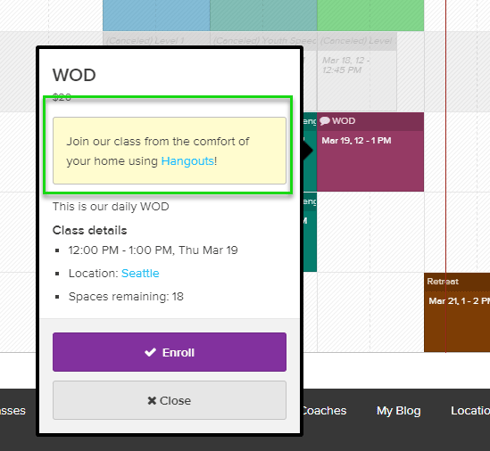
When a class or course schedule changes, you can alert enrolled clients by adding a Website Note. Website Notes are visible to anyone looking at a class or course schedule.
Website Notes appear in:
- A note notification sent to everyone currently on the roster
- On the Client Mode Web App schedule pop up for the class
- On the enrollment confirmation page
- In the Enrollment Confirmation Email
- On the Client Mode Web App Visit details page
- In the Enrollment Reminder Email
Learn more about Creating and Sending Notes.
Place Plans On Hold
Modify and Remove End Date for Passes and Plans
Prepaid Passes & Plans
As a Staff member, you can set a new end date of a prepaid pass or prepaid plan when the client wants to defer the end date of their prepaid pass or plan that is ending soon. This option is useful if you want to allow your client more time to redeem their unused visits.
Recurring Plans
As a Staff member, you can set a new end date of a recurring plan when a client wants to schedule the cancellation of their plan. If you set this end date by mistake or need to reschedule the cancellation, you can visit the plan to set a new end date or clear date altogether.
-
Setting end date to earlier date: Invoices due after the new end date will be cancelled and scheduled visits after the new end date will be considered unpaid unless the client has another applicable plan. The end date cannot be backdated before today.
-
Setting end date to later date: Invoice due after the new end date will be reopened and any invoices due after the new end date will be cancelled.
-
Clearing end date: Invoices that were cancelled will be reopened as if an end date was never set.
Extending Pass End Dates in Bulk
Our customer care team can extend all of your active passes at once by up to 60 more days. If you wish to have us help with this project, contact help@pike13.com including a report with the passes you wish to extend and how many additional days.