
In This Article
Who can use this feature?
- Pike13 Plans: ✅Premium, ✅Advanced, ✅Essential
- User Roles: ✅Primary Owner, ✅Owner, ✅Manager, ❌Staff, ❌Limited Staff
Scheduling Class Times
After creating a new class in Pike13, you'll be prompted to schedule its meeting times. If the class occurs multiple times per day, you’ll need to add each time separately.
- At the top of any Pike13 page, click Settings then click Services.
- Select the class you wish to modify.
- To schedule new sessions click + New Class Time.
- Enter the following details:
- Name: This defaults to the service name, but it can be customized. E.g. 8:30 Yoga with John, or MWF Beginner Swim.
- Location: Available if your business has multiple locations.
- Start date and time
- End time
- Repeats:
- Does not repeat: This is a single session being scheduled.
- Daily: This class will recur every day forever, after a certain date or after a number of occurrences.
- Weekly: This class will recur on selected days of the week on a weekly basis forever, after a certain date or after a number of occurrences.
- Instructed by: Add the instructor for this series. You may leave this blank or even add multiple instructors.
- Room: Available if your business has rooms. This is filtered by the selected location. You may leave this blank or even add multiple rooms.
- Click Finish to save the schedule.
Note
New Class Time vs Add Another Time
If you click + Add Another Time you are adding time to an existing class series - not creating a new series. This option will only appear if you have bulk enrollment enabled.
Adding to an Existing Series
- At the top of any Pike13 page, click Settings then click Services.
- Select the class you wish to modify.
- In the Class Times tab, click the scheduled series of interest.
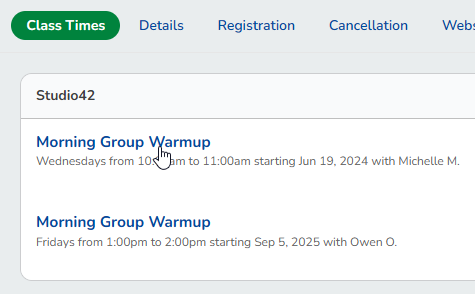
- Bulk Enrollment must be enabled for classes to have this option.
- In the right menu of the class page select + Add Another Time.
- Enter the following details:
- Location: Available if your business has multiple locations.
- Start date and time
- End time
- Repeats:
- Does not repeat: This is a single session being scheduled.
- Daily: This class will recur every day forever, after a certain date or after a number of occurrences.
- Weekly: This class will recur on selected days of the week on a weekly basis forever, after a certain date or after a number of occurrences.
- Instructed by: Add the instructor for this series. You may leave this blank or even add multiple instructors.
- Room: Available if your business has rooms. This is filtered by the selected location. You may leave this blank or even add multiple rooms.
- Click Finish to save the schedule.