
Pike13 can automatically remind clients when a recurring plan payment is still unpaid after its due date. This is off by default.
In This Article
Who can use this feature?
- Pike13 Plans: ✅Premium, ✅Advanced, ✅Essential
- User Roles: ✅Primary Owner, ✅Owner, ✅Manager, ❌Staff, ❌Limited Staff, ❌Client
Turning on past due reminders
- At the top of any Pike13 page, click Settings, then click Advanced Settings.
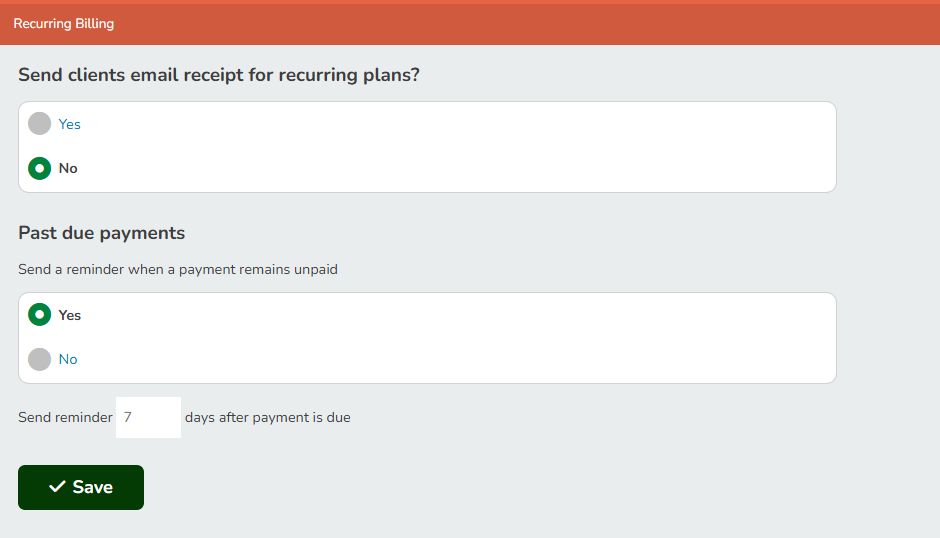
- In the Client Management section, click Recurring Billing.
- Turn on the past due payment reminder.
- Enter how many days after the due date to send the reminder (1 to 30).
- Click Save.
How reminders work
- Pike13 checks each day for recurring plan invoices that are past due by your chosen number of days and still have a balance, including partially paid invoices.
- Each unpaid invoice gets one reminder. The email says the payment was due on a specific date and hasn't been received, and links to the bill.
- Reminders follow each client's notification preferences. Account managers get a version for the person they manage.
- The reminder is sent whether or not the plan is still active.
What isn't included
- One-time invoices
- Canceled or voided invoices
- Invoices that were already past due before you turned on reminders
Note: This is separate from the Payment Due notice clients get three days before a payment is due. If your business uses integrated payments, clients may also get the existing failed payment notice.