
The Clients page now includes filter and sort controls that make it easier to find the right clients — especially useful for larger businesses with many client profiles.
In This Article
Who can use this feature?
- Pike13 Plans: ✅ Premium, ✅ Advanced, ✅ Essential
- User Roles: ✅ Primary Owner, ✅ Owner, ✅ Manager, ✅ Staff, ❌ Limited Staff
Filtering Your Clients List
To filter the Clients list:
- Go to Clients at the top of the page.
- Click the Filter options to narrow your list by any of the following:
- Membership, Pass, or Plan — Show only clients currently holding a specific membership, pass, or plan.
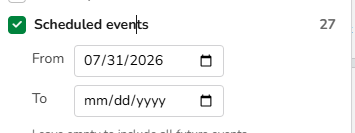
- Scheduled Events — Show only clients who have events scheduled during a designated time period.
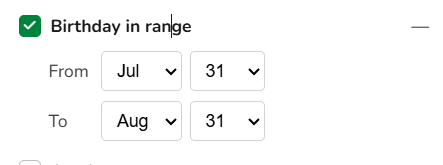
- Birthday in Range — Show clients who have a birthday during a specific time period.
-
Active Members: Shows only clients who currently have an active membership.
TIP
Filters are cumulative (AND, not OR). Combining multiple filters with your search text refines your search down to exact, highly targeted results.
Sorting Your Clients List
To sort the Clients list:
- Go to Clients at the top of the page.
- Use the Sort control to order your list by:
- First Name (default)
- Last Name
- Creation Date (recent)
NOTE
Filter and sort selections apply on top of any text you've entered in the search box.