
If your business allows client-initiated cancellations, you can cancel your own recurring plan directly from your Pike13 account on a mobile browser. You'll receive a confirmation email once your cancellation is processed.
Note
This feature is available on mobile web browsers only. If you are using the Pike13 client app, this update will be available when the new app version launches.
Caution
The Cancel button is only available if your business has enabled client self-service cancellations for your recurring plan. If you don't see the option described below, contact your business directly to request a cancellation.
In This Article
How to Cancel Your Plan
- Open Pike13 in your mobile browser and sign in to your account.
- Click on your name or profile icon to go to your account.
- Navigate to Plans & Passes.
- Find the recurring plan you want to cancel and select it.
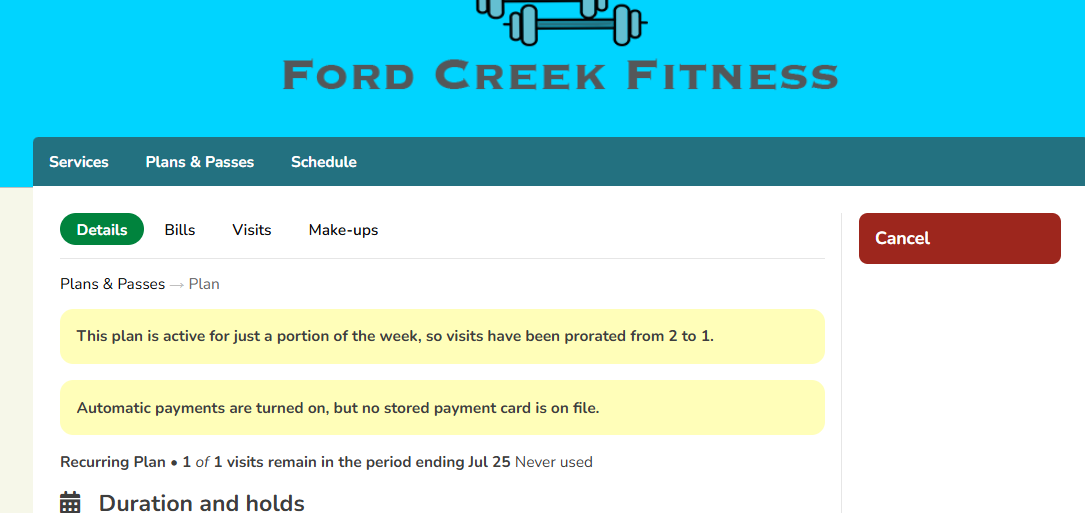
- Click on the Cancel button.
- To continue select Yes for Are you sure?
- This will complete your cancellation
What Happens Next
- You will receive an automatic confirmation email with the details of your cancellation.
- You can view your plan status at any time by visiting Plans & Passes in your account.