In This Article
Who can use this feature?
- Pike13 Plans: ✅Premium, ✅Advanced, ✅Essential
- User Roles: ✅Primary Owner, ✅Owner, ✅Manager, ✅Staff, ✅Limited Staff
Overview of Staff Dashboard
The Staff Dashboard is your personal command center in Pike13. Regardless of your staff role, you can access the dashboard to view:
-
Your Schedule: Upcoming classes and appointments you are instructed to teach.
-
Notes: Important messages from management or system alerts.
-
Payroll: Pending pay items (e.g., commissions or per-session rates).
Viewing on a Large Screen (Tablet or Desktop)
-
Log in to your Pike13 staff account.
-
Click your Profile Photo or initials in the top right corner of the page.
-
Click My Dashboard.
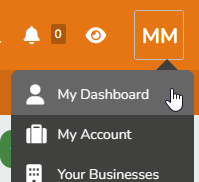
When staff login, they can go to their dashboard to see their schedule, notes and any pending pay items. All staff roles can view their dashboard including owners, managers, staff and limited staff members.