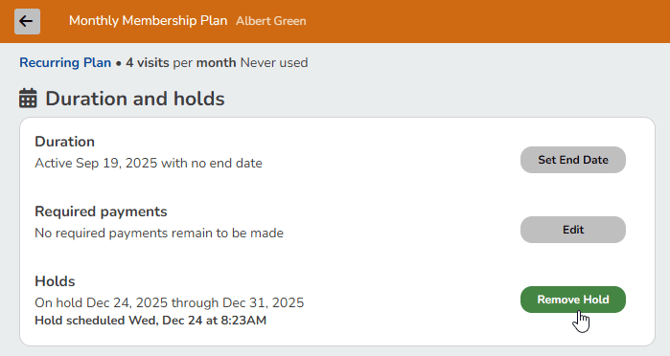
Holds can be placed on prepaid and recurring plans to accommodate your clients as needed. This is helpful for business closures or if clients have a personal need to suspend their plan.
In This Article
- Who can use this feature?
- Plan Holds Overview
- Impact on Rollover Visits
- Hold Duration
- Hold Fees
- Applying Holds
- Removing Holds
Who can use this feature?
- Pike13 Plans: ✅Premium, ✅Advanced, ✅Essential
- User Roles: ✅Primary Owner, ✅Owner, ✅Manager, ✅Staff, ❌Limited Staff
Plan Holds Overview
When a plan is put on hold, Pike13 saves the unused portion of the client's last payment as credit for the next invoice. When the hold ends, that credit is applied to the time remaining until the next regular billing cycle. If the credit doesn't cover the full amount, a prorated payment is charged to get the client back on their normal schedule.
Examples:
- A hold with a scheduled end date is placed on a plan with billing on the first of the month, but the hold is removed early by a staff member.
- Aug 1: Client pays the full amount of $50 for a monthly plan billing on the 1st of every month.
- Aug 3: The plan is placed on hold from Aug 3 to Nov 2. (Aug 1 and 2 were the only days used from the payment on Aug 1.)
- Oct 10: Staff removes the hold early. Because only Aug 1 and 2 were paid for in a 30-day month, the next bill date is 28 days from Oct 10, landing on Nov 7.
- Nov 7: For this bill, the client pays for Nov 7 - 30. The adjustment for the reduced billing period of Nov 7–30 is $40. ($50 / 30 days = $1.67 per day. $1.67 x 24 days = $40.)
- Dec 1: The client pays $50 again, back on normal monthly billing cycle of $50 on the first of the month.
- A hold with a scheduled end date is placed on a plan with a fixed billing date of the 17th of each month.
- Mar 13: Staff places the plan on hold from March 21 - April 20.
- Mar 17: Monthly plan bill paid in full for $100. March 17-20 are the only days the plan is available to cover visits.
- March 21: The plan is on hold until April 20.
- April 20: The hold ends. Only 4 days were paid for in March (13, 14, 15, and 16). The next bill date is 27 days after the hold ended. The next bill is May 17.
- May 17: Client pays the full amount again and is back on the monthly business cycle.
Note
Impact On Visits
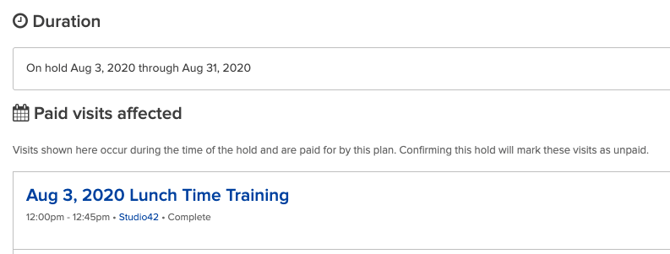
If a hold is set to start on August 3, the hold begins on that day and the plan is not available to pay for visits scheduled on August 3. When you set the plan on hold, Pike13 will alert you if a paid visit will be impacted by the hold.
Impact on Rollover Visits
When a plan allows rollover visits, a hold extends the expiration date of those visits by the duration of the hold. For example, a one-week hold gives you one extra week into the following month to use your rollover visits.
Hold Duration
You can set a hold duration in three ways:
- Indefinite: Until manually cleared by a staff member (e.g., for injury recovery)
- Fixed Period: A set number of days, weeks, or months (e.g., for vacations)
- Specific Date: Until a chosen calendar day (e.g., for business closures)
Hold Fees
If a hold fee was set when the plan was created, the client will be charged the fee when a hold is applied. A hold fee can help cover any administrative costs incurred by placing the plan on hold. Similar to discounting a plan or editing a plan’s signup fee, a staff member can adjust a plan’s hold fee during checkout.
Applying Holds
- At the top of any Pike13 page, click Clients, then select the client of interest.
- In the right menu of the client's profile page, click Plans & Passes.
- Select the plan you want to put on hold.
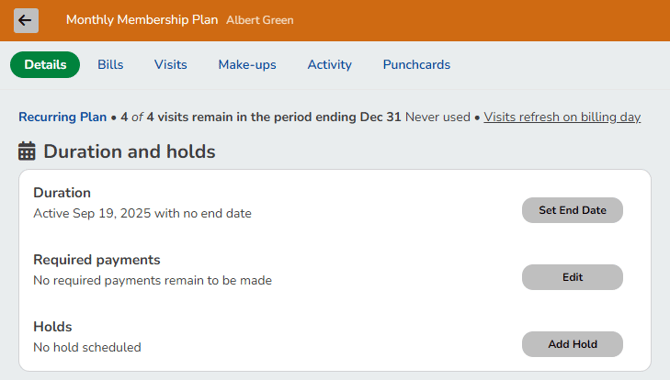
- On the plan page, under Holds, click Add Hold.
- Start date defaults to today's date. You may change this date to be in the future, but it cannot be set in the past.
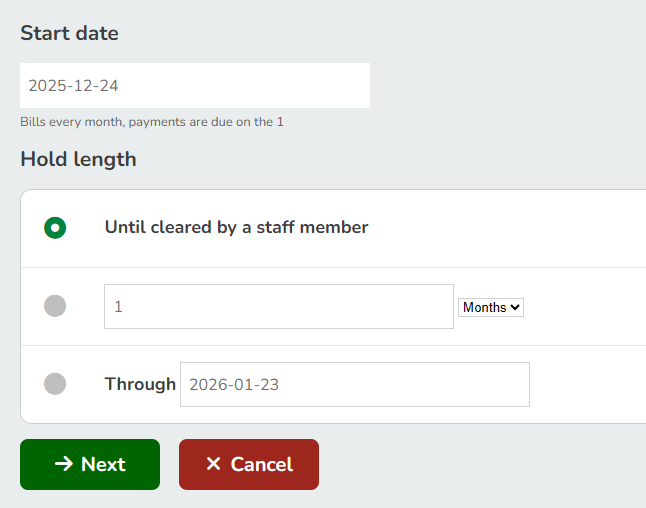
- Set a Hold length
- Click Next.
- Start date defaults to today's date. You may change this date to be in the future, but it cannot be set in the past.
- Review the summary of changes before clicking Confirm to save the hold or Go Back to make more changes.
- If a hold fee applies for this plan, you will be taken to the shopping cart to process the fee. Once the fee has been paid, the plan will be placed on hold.
Removing Holds
- At the top of any Pike13 page, click Clients, then select the client of interest.
- In the right menu of the client's profile page, click Plans & Passes.
- Select the plan of interest.
- On the plan Details page, under Duration and holds, click Remove Hold, then click Yes.