
In This Article
Booking an Appointment Pike13 Website
- Sign in to the Pike13 website where you want to book an appointment
- Select Menu at the top left hand corner, and then click Appointments choose the type of appointment you wish to book.
- If you have the option to book the appointment at more than one location, choose a location.
- To book an appointment with a particular staff member:
- Click on Filter.
- Choose the Staff member.
- Click Apply.
- Select the morning, afternoon, or evening box that shows times available, and then choose the time slot you wish to book.
- If you manage another person, choose whom the appointment is for.
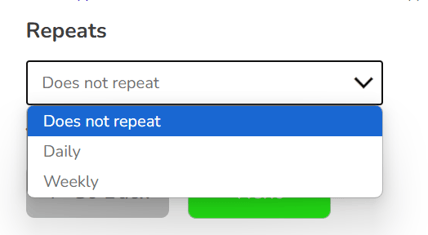
- Depending on the business, you may see the option to book a recurring appointment. You will be able to choose Daily or Weekly.
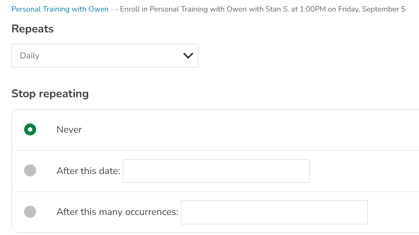
- From here you can choose if you wish it to repeat forever, repeat until a certain date or repeat for a certain number of occurrences.
- If you have not purchased a pass or plan to pay for this appointment, you may be prompted to make a purchase in order to book the appointment.
- If you have more than one pass or plan to pay for your booking, choose which you want to use
- Click Finish.
Warning
Scheduling Conflicts
When booking a recurring appointment, you may receive a scheduling conflict warning if one or more time slots in the series are unavailable. If this happens, the entire series cannot be booked. To proceed, you can either select a different time or contact the business regarding availability.
Canceling an Appointment Pike13 Website
- Sign in to the Pike13 website.
- Under Upcoming Schedule , click the name of the appointment you wish to cancel your registration for.
- Click Cancel Registration, and then choose OK.
Warning
Late Cancellations
When you go to cancel your upcoming appointment and it shows "Late Cancel", you may be charged a fee or have a visit deducted. This will depend on the particular business's cancellation policy. If you have questions about their policy, please reach out directly to the business.