
A single-visit price is required when creating a service. You can limit who can buy the single-visit pass to client and members, members only, or only staff members can sell it.
In This Article
Who can use this feature?
- Pike13 Plans: ✅Premium, ✅Advanced, ✅Essential
- User Roles: ✅Primary Owner, ✅Owner, ✅Manager, ❌Staff, ❌Limited Staff
Configuring Single-Visit Passes
- At the top of any Pike13 page click Settings, then Services.
- Click + New Service.
- Choose + New Class Service or + New Appointment Service.
- Enter a single-visit price.
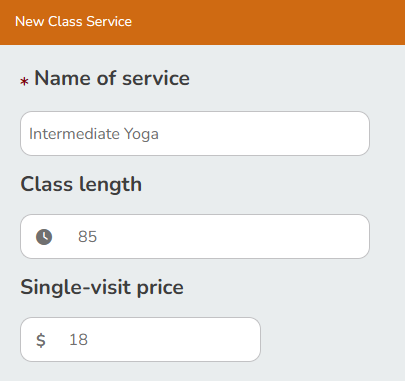
- Set Who can buy a single visit?
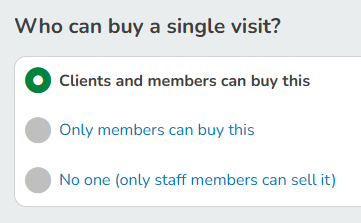
- If you do not wish to allow clients to purchase or see the single visit price, you can choose to set it to No one (only staff members can sell it).
-
Continue configuring the service.
Modifying Single-Visit Passes
- At the top of any Pike13 page click Settings, then Services.
- Choose the service you wish to update.
- Click the Details tab.
- In the Single-visit price section, click Edit.
- Make any necessary changes and click Save.
Best Practice
Single-Visit vs Prepaid Pass
If you wish to include terms and conditions or allow clients to purchase a single visit prior to enrolling in a class or appointment, you can create a separate prepaid pass that is good for 1 visit. To avoid confusion, we recommend not allowing clients to purchase the single-visit pass included with the service.